
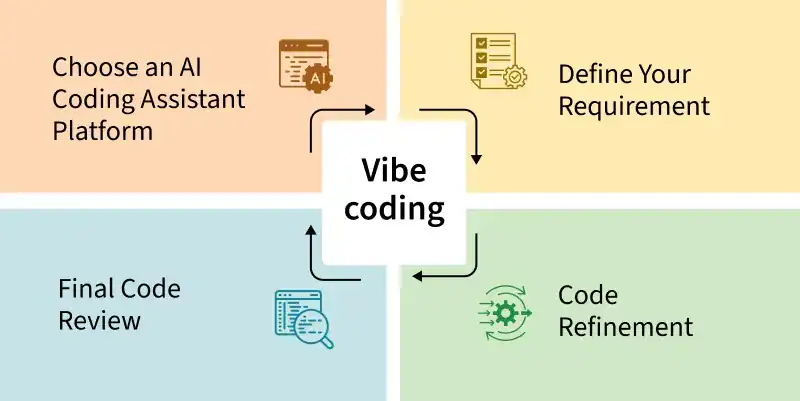
Vibe coding is an innovative software development approach that leverages artificial intelligence (AI) to generate functional code from natural language prompts, thereby accelerating development and making application creation more accessible, particularly for individuals with limited programming expertise. Coined by AI researcher Andrej Karpathy in early 2025, this methodology shifts the developer’s primary role from writing code line-by-line to guiding an AI assistant through a conversational process to generate, refine, and debug applications. This allows developers to concentrate on the broader objectives of their applications, while the AI manages the intricate coding tasks.
Vibe coding is generally applied in two main ways: “Pure” vibe coding and Responsible AI-assisted development. “Pure” vibe coding, an exploratory form, involves fully trusting the AI’s output, akin to “forgetting that the code even exists.” This approach is ideal for rapid ideation or “throwaway weekend projects” where speed is paramount. In contrast, Responsible AI-assisted development represents a more practical and professional application. Here, AI tools function as powerful collaborators, or “pair programmers.” Users guide the AI but then meticulously review, test, and comprehend the generated code, assuming complete ownership of the final product.
The vibe coding process operates on two levels: a low-level iterative loop for refining specific code and a high-level lifecycle for building and deploying complete applications.
The Code-Level Workflow
This involves a tight, conversational loop for creating and perfecting code:
- Describe the goal: Begin with a high-level, plain language prompt, such as “Create a Python function that reads a CSV file.”
- AI generates code: The AI assistant interprets the request and produces initial code.
- Execute and observe: Run the generated code to assess its functionality.
- Provide feedback and refine: If the output is incorrect or an error occurs, provide new instructions, for example, “Add error handling for when the file is not found.”
- Repeat: This cycle of describing, generating, testing, and refining continues until the code is complete.
The Application Lifecycle
This is the broader process of transforming a high-level concept into a deployed application:
- Ideation: Describe the entire application in a single, high-level prompt using tools like Google AI Studio or Firebase Studio.
- Generation: The AI generates the initial version of the complete application, including the user interface, backend logic, and file structure.
- Iterative refinement: Test the application and use follow-up prompts to add new features or modify existing ones.
- Testing and validation: A human expert reviews the application for security, quality, and correctness.
- Deployment: With a final prompt or a single click, deploy the application to a scalable platform such as Cloud Run.
Vibe Coding Versus Traditional Programming
Traditional programming emphasizes the details of implementation, requiring manual writing of specific commands, keywords, and syntax. Vibe coding, conversely, allows developers to focus on the desired outcome, describing goals in plain language (e.g., “create a user login form”), while the AI handles the actual code generation.
Here’s a comparison:
| Feature | Traditional Programming | Vibe Coding |
|---|---|---|
| Code Creation | Manual coding line by line | AI-generated from natural language prompts |
| Developer/User Role | Architect, implementer, debugger | Prompter, guide, tester, refiner |
| Coding Expertise | Higher (knowledge of programming languages and syntax) | Lower (understanding of desired functionality) |
| Primary Input | Precise code | Natural language prompts and feedback |
| Development Speed | Generally slower, methodical | Potentially faster, especially for prototyping simpler tasks |
| Error Handling | Manual debugging based on code comprehension | Refinement through conversational feedback |
| Learning Curve | Often steep | Potentially lower barrier to entry |
| Code Maintainability | Relies on code quality, developer skill, and established practices | Can heavily depend on AI output quality and user review |
Getting Started: Choosing Your Vibe Coding Tool
Google Cloud offers several tools for vibe coding, with the choice depending on the user’s goal. Google AI Studio is suitable for rapid prototyping, Firebase Studio for building full-stack applications, and Gemini Code Assist for professional developers working on existing projects within their IDE. Once a prototype is complete, it can be deployed to Cloud Run.
- Google AI Studio: Ideal for quickly realizing an idea into a live, shareable web app, often with a single prompt. It’s a No-Code/Low-Code solution for beginners.
- Firebase Studio: A powerful, web-based environment for building production-ready applications with robust backends. It’s a Low-Code/No-Code option for beginners to intermediate users.
- Gemini Code Assist: An AI pair programmer for professional developers, integrating directly into IDEs like VS Code or JetBrains. It provides in-editor assistance for code generation, explanation, and testing within existing workflows.
How to Vibe Code with Google AI Studio
- Describe what you want to build: In AI Studio’s prompt area, describe the desired application (e.g., a “startup name generator”). AI Studio will generate the code and a live preview.
- Refine the app: Use the chat interface to refine the app’s appearance and functionality with follow-up prompts (e.g., change background color, add features).
- Deploy to Cloud Run: Once satisfied, click “Deploy to Cloud Run” to publish the app to a public URL.
How to Vibe Code with Firebase Studio
- Describe your full application: In Firebase Studio, describe the complete application, even a robust, multi-page one (e.g., a recipe-sharing app with user accounts).
- Review and refine the app blueprint: Review the AI-generated blueprint, outlining features, style, and technology. Provide feedback to refine it before code generation.
- Generate the prototype: Once the blueprint is approved, click “Prototype this App” to generate a working, interactive prototype.
- Make edits to your live prototype: Continue the conversation to make visual changes, add features, or introduce new logic.
- Deploy your application: Click “Publish” to deploy the application to a public URL using Cloud Run.
How to Vibe Code with Gemini Code Assist
- Generate code within a file: Open a project file in your IDE and use the Gemini chat or an in-line prompt to describe the required code block or function. The AI will insert the code directly.
- Refine and improve existing code: Highlight existing code and use prompts to modify or improve it (e.g., add error handling, enhance performance).
- Generate tests: Ask Gemini to generate unit tests to ensure production-quality code.
Vibe coding is transforming software creation by lowering the entry barrier for new creators and empowering experienced developers to focus on creative problem-solving rather than manual implementation.